
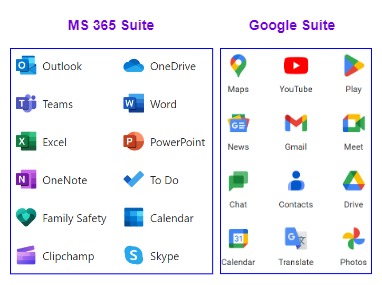
Real-Life Example:
Let’s look at a real-life example to assist us in comprehending the entire working mechanism and flow. Assume we went to a hotel with various amenities such as rooms, houses, or lodges, a massage shop, a swimming pool, a laundry, a cafeteria, badminton courts, a football and cricket field, and so on. Each facility has a security guard at the entrance to verify our identity, so if we need to use any of the facilities listed above, we must show our identity each time.
Have you realized how inconvenient and disappointing it is to have to present our identification at each entrance? What if our identity, such as a passport or other government-issued ID, is verified at the main gate only while entering the hotel, and after successful verification, the receptionist ties a ribbon around our wrist to indicate that we are a verified person, and security at the facility entrance allows us to use the facilities seamlessly? What do you think? Isn’t this quite interesting and will give you a VIP feeling? We are now verified and can use and enjoy all facilities without confinements. Hope the above example is very much clear to you not let’s begin with the technical part.
Table of contents=>
- Federated Identity Management
- What is a Single Sign On (SSO)?
- Types of Federated SSO
- How does SSO operate?
1 Principal.
2 Identity Providers (IdP).
2.1 Types of SSO Authentication.
3 Service Providers (SP). - What is SAML?
- Pros and cons of SSO
- SSO Security Threats
Federated Identity Management (FIM)-:
When two applications are “federated,” a user can use one by authenticating their identity with the other, eliminating the need for both to have separate usernames and passwords. The Identity Provider (IdP) is responsible for carrying out this authentication. in short, we can say that FIM refers to the ability to connect a user’s digital identity across different security domains. When we are signing into an application/website with a google account this means our google identity is used instead of creating a new identity for each application. so in this process, we have authorized a third-party application/website to use our google identity and Google will acts identity provider (IdP) and will authenticate the request.
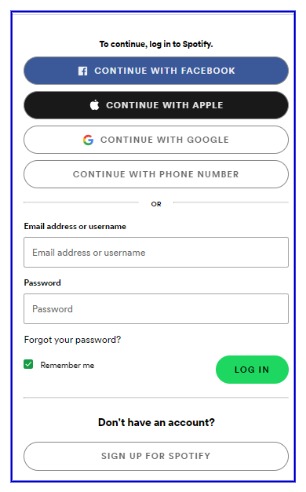
In the below diagram, you can check how many options are available to digitally sign into Spotify without creating a separate account for Spotify itself. you can sign in with your Google, Facebook, & with your Apple ID.
There is a difference between Authorization and Authentication
- Authorization => Providing permission to use identity
- Authentication => verifying the user or application that the request coming from the legitimate user/application/website.
In the above example, the user is authorizing (granting permission) Spotify, to use its identity. and Google, Apple, and Facebook whichever is chosen at the time of sign-up are responsible for authenticating (verifying user) requests as they are IdP.
What is Single Sign On (SSO)?
Single Sign On (SSO) allows the user to access multiple applications, web services, etc. without re-entering credentials for each application. If the user sign in to one Application then it passes the authentication tokens to the configured applications and allows them to access all configured applications seamlessly. Because SSO is part of a larger concept known as Federated Identity Management, it is sometimes referred to as federated SSO. FIM simply refers to the establishment of a trust relationship between two or more domains or identity management systems. Single Sign-on is frequently a feature available within an FIM architecture.
Types of Federated Single Sign on SSO -:
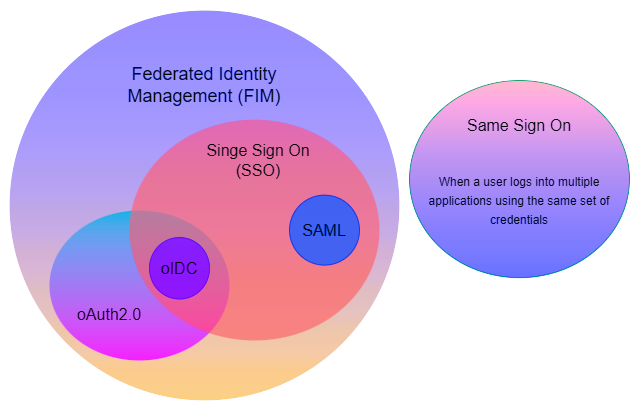
As previously discussed, SSO falls under Federated Identity Management (FIM), which is a very broad concept. The Venn diagram below illustrates what FIM entails.
- SAML-based SSO.
- oIDC (Open ID Connect) based SSO
- oAuth (Open Authorization) based SSO
- Same Sign On
oIDC (Open ID Connect) based SSO-:
OpenID Connect (oIDC) is an open authentication protocol that works on top of the OAuth 2.0 framework. When a user attempts to access a protected HTTPs endpoint, it allows applications/websites to verify the user’s identity. this is created by the OpenID Foundation, such as Google and Microsoft.
oAuth (Open Authorization) based SSO-:
Open Authorization (oAuth) is the industry-standard authorization protocol. It is a standard that enables a website or application to access resources hosted by other web apps on behalf of a user.
Same Sign-On-:
When a user logs into multiple applications using the same set of credentials is known as same sign-on as the credential are duplicated.
SAML-based SSO-:
The Security Assertion Markup Language (SAML) is an open standard based on XML that allows for the secure exchange of authentication and authorization data between IdP and SP. This most widely used open standard for SSO, Let’s discuss in detail how its works
How SAML-Based SSO works?
In the SAML-SSO framework mainly 3 players are involved in providing access to a particular bunch of applications.
1. Principal
the user who enters credentials into a particular application for a single time.
2. Service Providers
mainly these are the application whose service users wants to access.
3. Identity Providers (IdP)
the directories are the identity providers such as MS active directory. This store’s identity (credentials) of users.
Let’s understand this whole process with an example
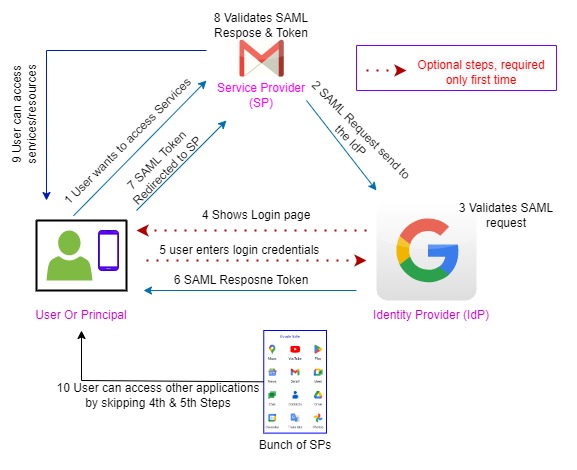
Suppose our principal wants access to his Google Gmail services, then he will redirect to the Gmail login page & asked to input his user credentials. Then Gmail sends the (security assertion markup language) SAML file to Google IdP for user authentication once the user is authenticated by the Google IdP then it will generate SAML tokens. And this token will validate users for its other services such as Google Drive, keep notes, YouTube, maps, calendar, and all Google applications we use regularly. Users don’t require to sign in on each application to explore services. He can use all applications seamlessly. you can refer to the above diagram for the step-by-step working mechanism which aid you to understand the whole process. The 4th & 5th steps are optional step once the user/principal is authenticated then it will direct;y provide access to all configured applications without providing credentials again & again.
Based on IDP or SP, there are two types of SSO Authentication.
IdP Initiated-:
User-agent will send a request to IdP, then IdP asks for credentials from the user agent and the user is promoted for authentication. After the user authenticates IdP generates SAML assertion and it will be signed.
If a user wants to access a service provider, then IdP will send SAML assertion through the user agent to Service Provider, since the user is already authenticated in IdP and SAML assertion is already provided to SP then there is a trust relationship, and the user can access the application.
Service Provider Initiated-:
The user will send a request to Service Provider as the user is not authorized, SP will redirect the request to IdP, then the IdP asks for credentials from the user, and the user gets authenticated in IdP then it will generate a SAML assertion, it will then send SAML assertion through user agent to SP.
Now IdP will send this SAML assertion through the user agent to SP, as already it is authenticated in IdP there is no need to provide credentials to SP. The above workflow is based on this authentication, after this session can start.
What is SAML-:
Security Assertion Markup Language is an Open standard for identity exchange between identity providers and service providers
Pros of SSO-:
- SSO save time users time by authenticating application in the backend and providing a great user experience.
- Reduces IT administrator tasks.
- Users have a tendency of forgetting passwords so it will also reduce the burden of remembering passwords for different applications.
Cons of SSO-:
- One credential for all application lead to a major security threat. there is MFA (Multifactor Authentication) but can be exploited by impersonating an IT administrator.
- Access to all confidential information, database, servers, etc.
- However, if an organization has implemented SSO, users must sign in to resources such as WiFi networks, VPNs, cross-OS devices, file servers, and so on.
Security Threats & Solution -:
- The SSO requires only one password for all applications then if any unauthorized person got the password then he can access the entire application/services.
- But in case the user uses a different password for its application and web services then the unauthorized person can access only a particular application/web service, not all services still struggle to find out the password for other applications.
- The best way to protect against unauthorized access is by adopting a zero trust policy, which will authenticate user identity each time, and for each application using a different password for different resources is the best thing, however, it’s quite time-consuming but safe. What do you think is the zero trust policy better? please mention your thought in the comments.
Happy Learning……………………….check out our articles on the counter circuit.
👇👇👇👇👇👇👇👇👇👇
IC CD4029, IC 74163, IC 74160, IC 7493, IC 74193, IC 7490, Counter Circuit using 555 timers.