
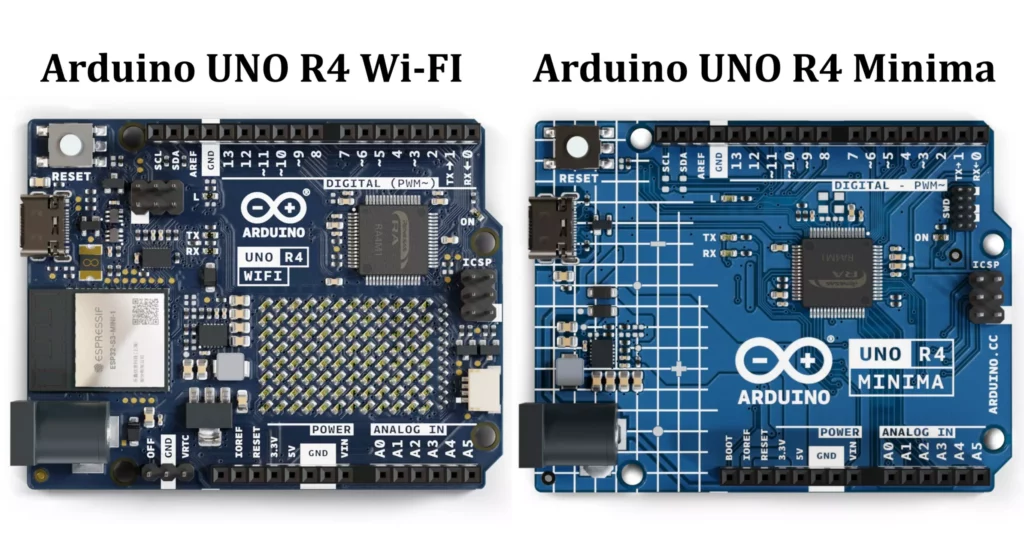
The Arduino UNO R4 is the latest evolution in the Arduino UNO series, offering significant improvements over the popular UNO R3. This article provides a detailed exploration of the Arduino UNO R4 Minima and Arduino UNO R4 Wi-Fi, covering their hardware, software, pinout, features, specifications, applications, and more. Whether you’re a beginner or an experienced developer, this guide will help you understand the capabilities of the Arduino UNO R4 and how to leverage them in your projects.
Overview of Arduino UNO R4
The Arduino UNO R4 is designed to bridge the gap between simplicity and advanced functionality. It retains the classic form factor and ease of use of the UNO series while introducing modern features like a 32-bit microcontroller, USB-C connectivity, real time clock RTC, and enhanced peripherals. The two variants are:
- Arduino UNO R4 Minima: A streamlined version with core features for general-purpose projects.
- Arduino UNO R4 Wi-Fi: Adds built-in Wi-Fi, Bluetooth, and a 12×8 LED matrix for IoT and interactive applications.
Specifications of Arduino UNO R4
The Arduino UNO R4 Minima and Wi-Fi are upgraded versions of the classic Arduino UNO, featuring a more powerful microcontroller while maintaining the same form factor and ease of use. Let’s break down its specifications and what they mean in simple terms:
1. Microcontroller (The Brain of the Board)
- Processor: Renesas RA4M1 (32-bit ARM Cortex-M4, 48 MHz)
- This is a much more powerful processor compared to the 8-bit ATmega328P (16 MHz) in the UNO R3.
- It means the board can handle more complex calculations and tasks faster.
- Flash Memory: 256 KB (For storing programs)
- More than 8 times the storage of the UNO R3 (which had only 32 KB).
- Allows you to write larger and more complex programs without running out of space.
- SRAM: 32 KB (For temporary data storage while running programs)
- Again, much higher than the UNO R3’s 2 KB, allowing for better performance, especially for projects that involve storing large amounts of sensor data.
- EEPROM: 8 KB (For storing data permanently even after power off)
- This is useful for saving calibration values, preferences, or logs.
2. Input/Output (Connecting Sensors, Motors, and Other Devices)
- Digital I/O Pins: 14
- These are the pins you use to turn things ON or OFF, like LEDs, motors, or relays.
- Works the same way as in the UNO R3.
- PWM Pins: 6
- PWM (Pulse Width Modulation) allows the board to simulate analog output, such as dimming an LED or controlling motor speed.
- Analog Input Pins: 6 (Up to 14-bit resolution)
- These are used to read sensors like temperature, light, and force sensors.
- In the UNO R3, it had 10-bit resolution (which gives values from 0 to 1023).
- The UNO R4 supports higher resolution (14-bit), meaning more precise readings (values from 0 to 16,383).
- DAC (Digital-to-Analog Converter): 1 Channel
- This is a new feature that the UNO R3 didn’t have!
- It allows the board to output true analog signals (instead of just PWM), useful for generating smooth waveforms for audio or precision control.
3. Communication Interfaces (Talking to Other Devices)
- UART (Serial Communication):
- Used for communication with the computer or other microcontrollers.
- This allows debugging and sending data via USB.
- I²C:
- Used for connecting multiple devices like sensors, displays, and EEPROMs with just two wires.
- SPI:
- A faster way to communicate with modules like SD cards, displays, and wireless transceivers.
- CAN Bus: (NEW FEATURE!)
- CAN (Controller Area Network) is used in automobiles and industrial machines for communication between multiple microcontrollers.
- This makes the UNO R4 useful for automotive applications.
4. Power Supply details
I/O Pin Voltage and Current Ratings
- Operating Voltage: 5V (Same as Arduino UNO R3)
- Logic Level: 5V (HIGH = 5V, LOW = 0V)
- Maximum Current Per I/O Pin: 8 mA (Recommended limit per pin)
- Total Maximum Current for All I/O Pins: 200 mA (Maximum combined output current)
- Built-in Pull-up Resistors: Approx. 40KΩ to 50KΩ (Can be enabled in software)
Power Supply Options
- USB-C Port: 5V (regulated)
- VIN Pin: 6V to 24V
- 5V Pin Output: 5V (regulated output from USB or VIN)
- 3.3V Pin Output: 3.3V (max 50 mA output, for low-voltage sensors)
5. Additional Features
- Wi-Fi & Bluetooth (NEW FEATURE!)
- ESP32-S3 module provides Wi-Fi & Bluetooth 5.0 connectivity.
- Makes it perfect for IoT projects, smart home automation, and remote-control applications.
- LED Matrix (NEW FEATURE!)
- 12×8 LED Matrix (96 LEDs) built into the board.
- Allows easy visual feedback without external displays.
- Qwiic Connector (NEW FEATURE!)
- I²C expansion port for plug-and-play sensor connections.
- Eliminates the need for soldering additional modules.
- RTC (Real-Time Clock) (NEW FEATURE!)
- Built-in clock keeps track of time, even when powered off (if a backup battery is connected).
- Useful for data logging, alarms, and time-based automation.
- USB Connector: USB-C (Upgraded from USB-B in UNO R3)
- Reversible design, faster data transfer, and more modern compatibility.
- Same UNO Form Factor:
- Physically identical to UNO R3, so most shields & accessories will still work.
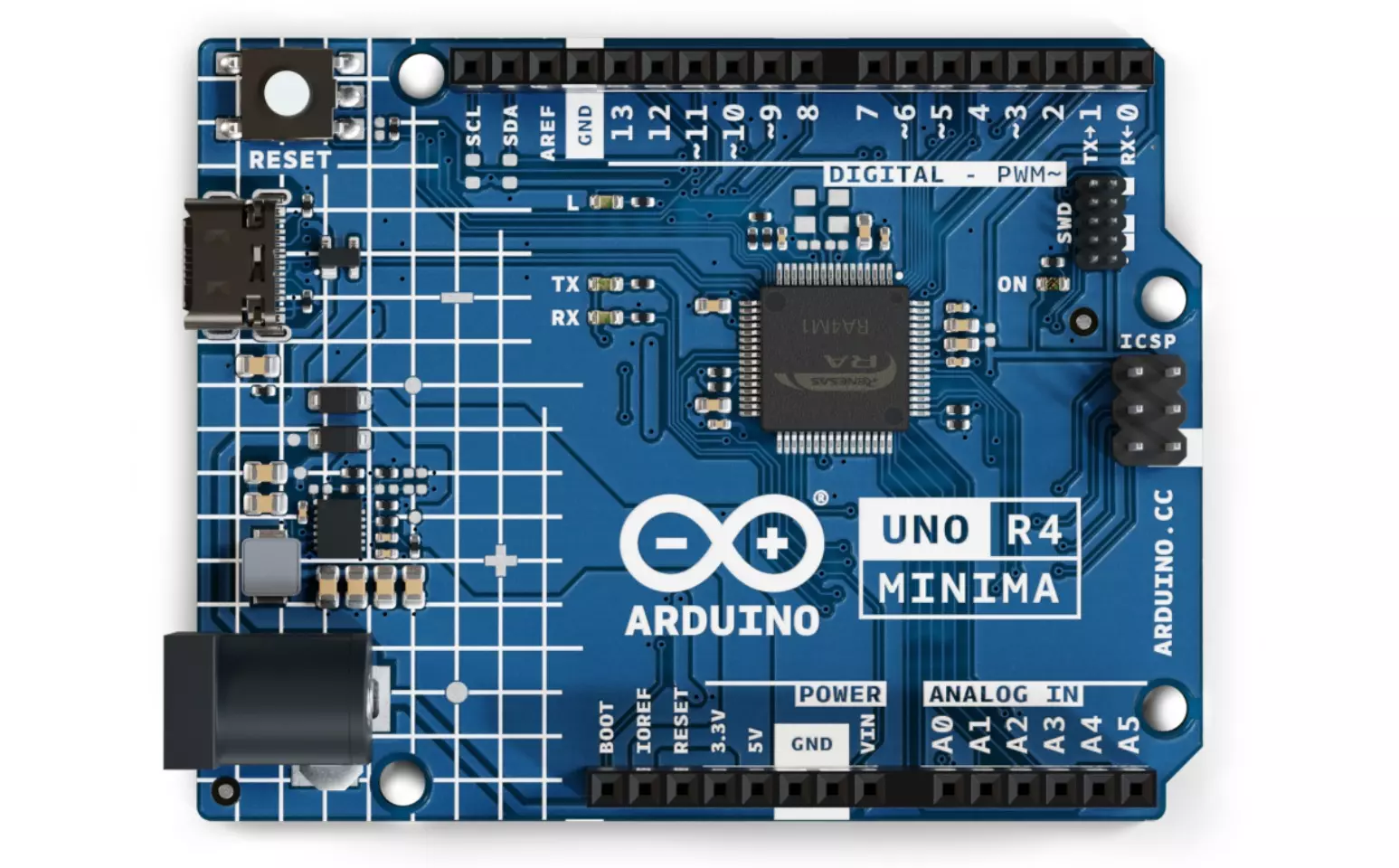
Comparison of Arduino UNO R4 Minima and Wi-Fi
The Arduino UNO R4 Minima and Arduino UNO R4 Wi-Fi share the same core processor but have some key differences, mainly in connectivity and additional features. Below is a detailed comparison:
| Feature | UNO R4 Minima | UNO R4 WiFi |
|---|---|---|
| Microcontroller | Renesas RA4M1 (ARM Cortex-M4, 48 MHz) | Renesas RA4M1 (ARM Cortex-M4, 48 MHz) |
| Flash Memory | 256 KB | 256 KB |
| SRAM | 32 KB | 32 KB |
| EEPROM | 8 KB | 8 KB |
| Operating Voltage | 5V | 5V |
| Input Voltage (VIN) | 6V – 24V | 6V – 24V |
| USB Connector | USB-C | USB-C |
| I/O Pins (Digital + Analog) | 14 Digital + 6 Analog | 14 Digital + 6 Analog |
| PWM Pins | 6 (D3, D5, D6, D9, D10, D11) | 6 (D3, D5, D6, D9, D10, D11) |
| DAC (True Analog Output) | 1 (A0) | 1 (A0) |
| ADC (Analog-to-Digital Resolution) | 14-bit | 14-bit |
| CAN Bus (Automotive Communication) | Yes | Yes |
| I²C / SPI / UART | Yes | Yes |
| Wi-Fi Connectivity | No | Yes (Espressif ESP32-S3) |
| Bluetooth Connectivity | No | Yes (ESP32-S3 supports Bluetooth 5.0) |
| Onboard LED Matrix (12×8) | No | Yes |
| Qwiic Connector (for I²C Sensors) | No | Yes |
| RTC (Real-Time Clock) | Yes | Yes |
| Hardware Compatibility (Shields & Accessories) | Same as UNO R3 | Same as UNO R3 |
| Power Consumption | Lower (no Wi-Fi or extra components) | Higher (due to Wi-Fi, LED matrix, and ESP32-S3) |
| Best For | General-purpose projects, embedded systems, automation, robotics | IoT, smart home, wireless communication, display-based projects |
| Price | Lower | Higher |
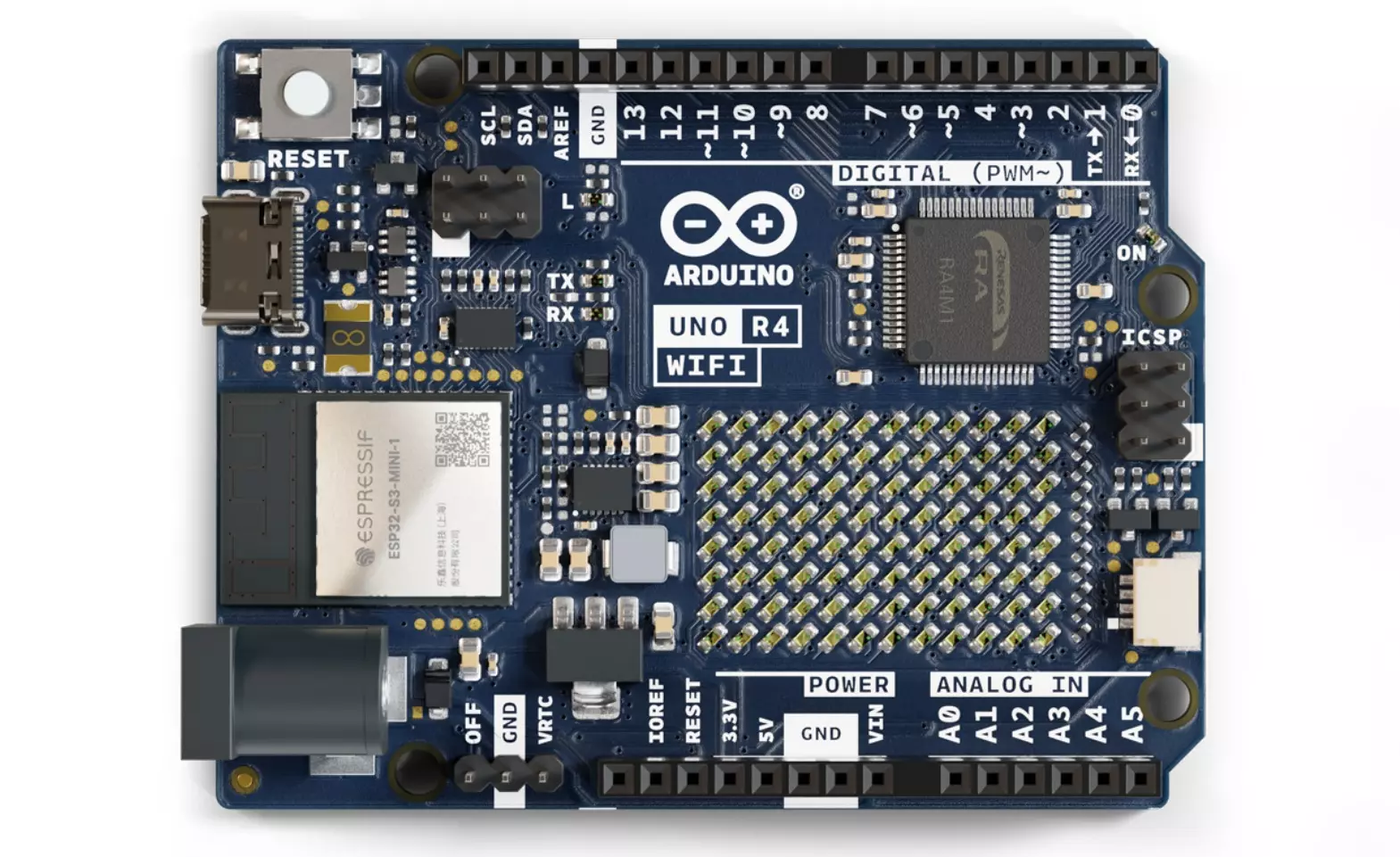
Arduino UNO R4 Wi-Fi & Minima Pinout Description
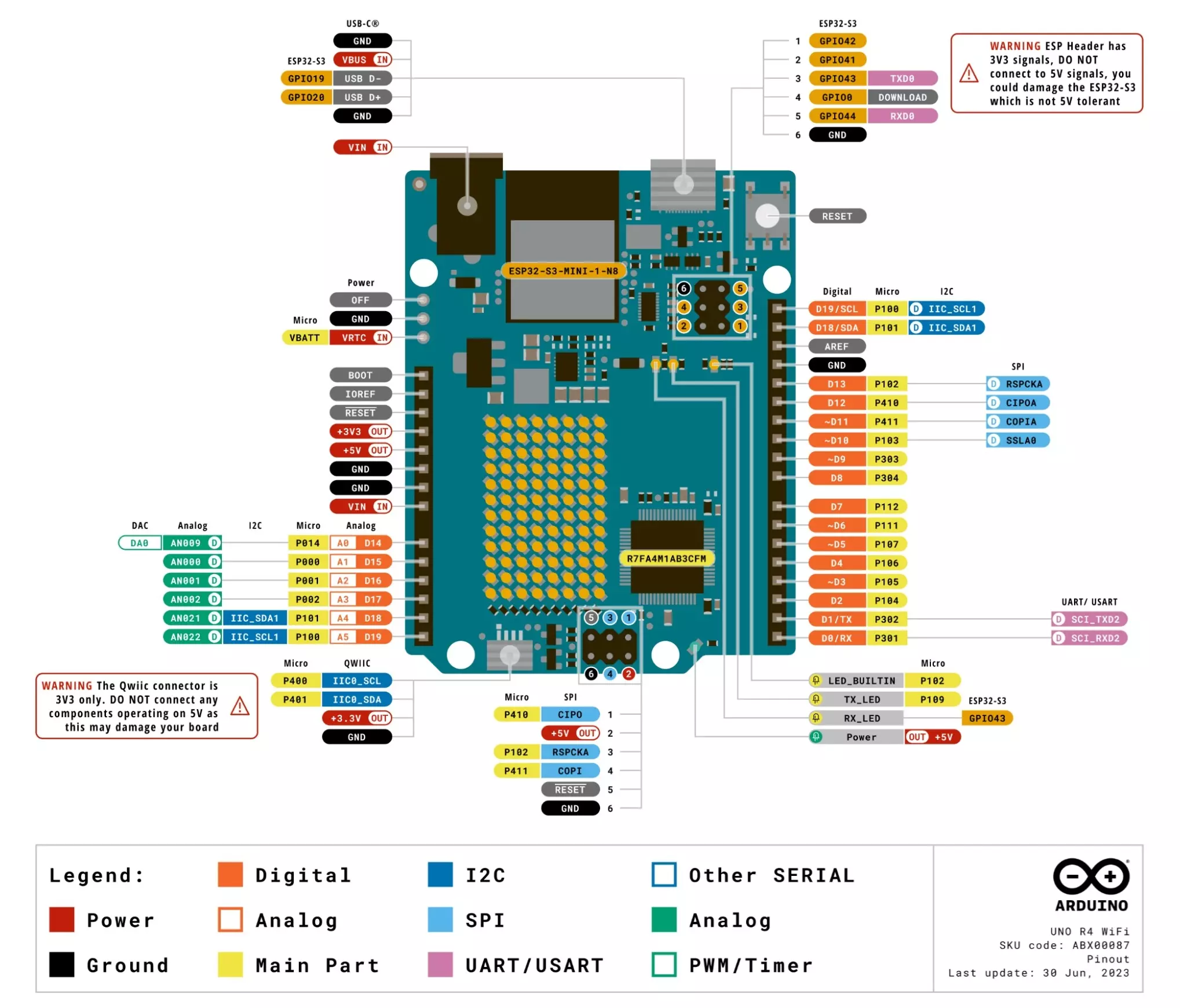
Both Arduino UNO R4 Minima and WiFi share the same core pinout, with additional features on the WiFi version.
14 Digital I/O Pins (0-13)
- D0 (RX) – UART Receive (Serial Communication)
- D1 (TX) – UART Transmit (Serial Communication)
- D2 – General-purpose Digital I/O
- D3 – Digital I/O, PWM Capable
- D4 – General-purpose Digital I/O
- D5 – Digital I/O, PWM Capable
- D6 – Digital I/O, PWM Capable
- D7 – General-purpose Digital I/O
- D8 – General-purpose Digital I/O
- D9 – Digital I/O, PWM Capable
- D10 – Digital I/O, PWM Capable, SPI SS (Slave Select)
- D11 – Digital I/O, PWM Capable, SPI MOSI (Master Out Slave In)
- D12 – Digital I/O, SPI MISO (Master In Slave Out)
- D13 – Digital I/O, SPI SCK (Serial Clock), Onboard LED
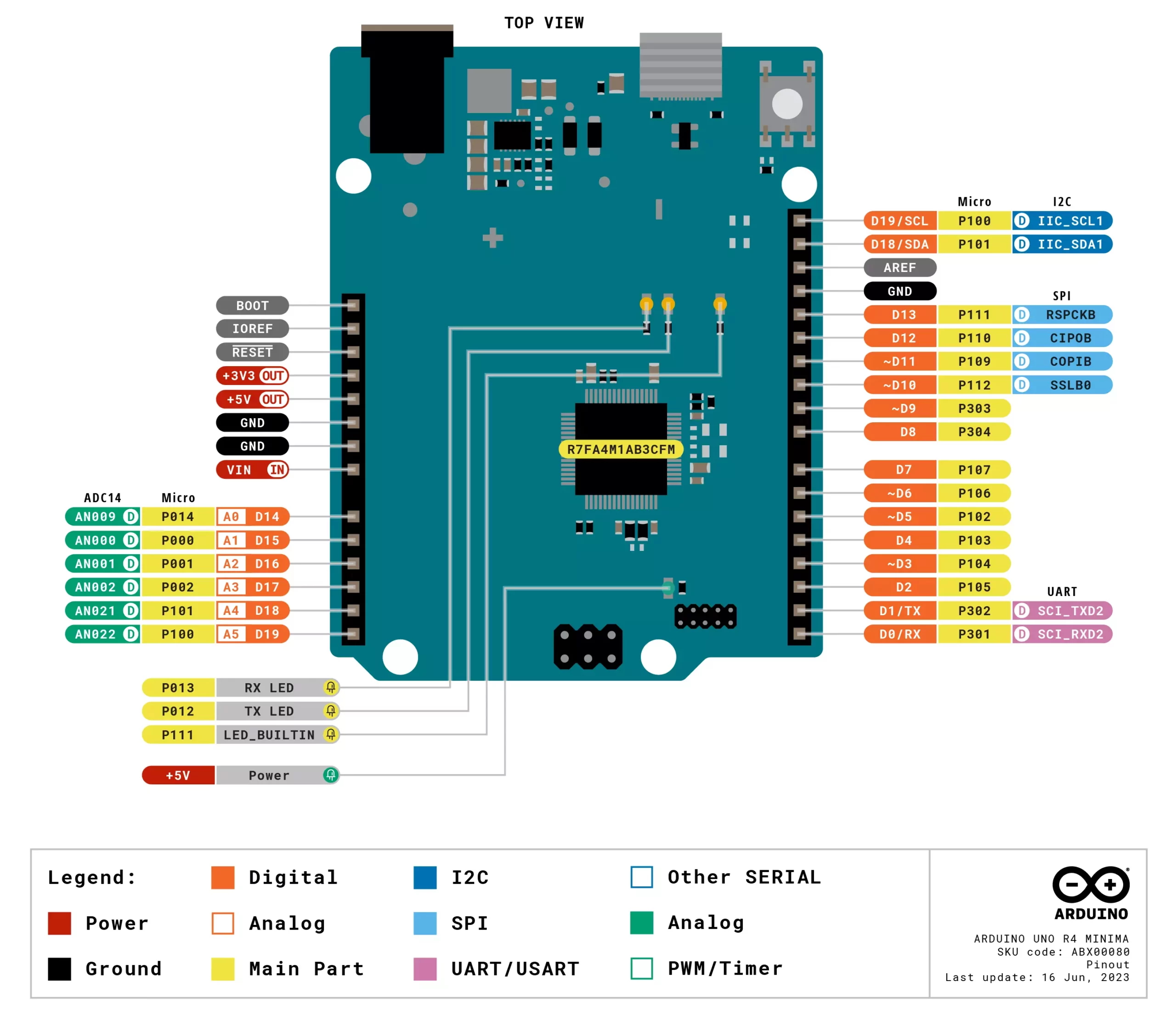
6 Analog Pins (A0 – A5)
- A0 – Analog Input & DAC Output (True Analog Output)
- A1 – A3 – Analog Inputs (14-bit ADC)
- A4 (SDA) – Analog Input, I²C Data Line
- A5 (SCL) – Analog Input, I²C Clock Line
Communication & Special Pins
- SDA (A4) – I²C Data for sensors/devices
- SCL (A5) – I²C Clock for synchronization
- SS (D10) – SPI Slave Select
- MOSI (D11) – SPI Master Out, sends data to SPI devices
- MISO (D12) – SPI Master In, receives data from SPI devices
- SCK (D13) – SPI Serial Clock
- CAN RX – CAN Bus Receive
- CAN TX – CAN Bus Transmit
Power Pins
- 5V – Regulated 5V power output
- 3.3V – 3.3V output (max 50mA)
- GND (Multiple Pins) – Ground connection
- VIN – External power input (6V-24V)
Extra Features (Only on UNO R4 Wi-Fi)
- ESP32-S3 – Handles Wi-Fi & Bluetooth
- Qwiic Connector – Easy I²C expansion for sensors
- LED Matrix – Onboard 12×8 LED matrix
Pricing of Arduino UNO R4 Minima and Wi-Fi
Arduino R4 Minima and Wi-FI are Available for purchase at various online retailers.
- Arduino UNO R4 Minima Price: 10$ to 20$
- Arduino UNO R4 Wi-Fi Price: 20$ to 30$
Please note that prices may vary slightly between retailers and are subject to change. For the most accurate and up-to-date pricing, it’s recommended to visit official Arduino retailers or authorized resellers.
Applications of Arduino UNO R4 Minima and Wi-Fi
The Arduino UNO R4 Minima and UNO R4 Wi-Fi share many applications, but the Wi-Fi version excels in projects requiring wireless communication and remote control.
Applications of Arduino UNO R4 Minima
The Minima is ideal for basic automation, control systems, and embedded applications that do not require Wi-Fi or Bluetooth.
1. Industrial & Embedded Systems
- Factory automation (e.g., monitoring machines, controlling robotic arms)
- Smart agriculture (e.g., automated irrigation, soil moisture monitoring)
- Process control (e.g., motor speed control, conveyor belt automation)
2. Robotics & Motion Control
- Autonomous robots (small-scale, sensor-based)
- Servo/motor control (e.g., robotic arms, CNC machines)
- Drone components (e.g., sensor fusion, motor controllers)
3. Data Acquisition & Logging
- Environmental monitoring (e.g., temperature, humidity, air quality)
- Health monitoring systems (e.g., pulse and ECG tracking)
- Home energy monitoring (e.g., electricity consumption tracking)
4. Home & Office Automation
- Smart lighting (e.g., motion-activated lights)
- Automated door locks (RFID or keypad-based)
- Office automation (e.g., automatic window blinds)
5. Educational & Learning Projects
- STEM education (electronics, programming)
- Arduino-based science experiments
- Interactive classroom projects
Applications of Arduino UNO R4 Wi-Fi
The Wi-Fi version is perfect for Internet of Things (IoT), remote monitoring, and wireless communication.
1. IoT (Internet of Things) & Smart Home
- Remote home automation (e.g., controlling appliances via smartphone)
- Wi-Fi-enabled smart lighting & climate control
- Security systems (e.g., Wi-Fi cameras, alarm systems)
2. Remote Monitoring & Control
- Wireless sensor networks (e.g., air quality, temperature, water quality monitoring)
- Smart agriculture (e.g., remote irrigation control via cloud)
- Industrial automation & monitoring
3. Wireless Robotics & Drones
- Wi-Fi-controlled robots (e.g., web-controlled rovers)
- Remote monitoring drones
- Wireless motion tracking
4. Smart Wearables & Health Monitoring
- IoT-based health monitoring (e.g., heart rate sensors sending data to the cloud)
- Wearable fitness tracking projects
- Remote patient monitoring (e.g., ECG & temperature data logging)
5. Wireless Data Logging & Cloud Applications
- Real-time weather stations (e.g., sending data to a web server)
- Remote energy monitoring (solar/wind energy tracking)
- Smart city applications (e.g., real-time traffic monitoring)
6. Advanced Educational & Research Projects
- AI & ML on microcontrollers (e.g., gesture recognition using ESP32-S3)
- Wireless Arduino projects for education
- Live sensor dashboards via Wi-Fi (Google Firebase, Thingspeak, etc.)
Arduino UNO R4 Example Code
- Install the Arduino IDE (version 2.0 or later).
- Connect the UNO R4 to your computer via USB-C.
- Select the appropriate board and port in the IDE.
- Upload a simple blink sketch to test the board.
Blink LED Matrix – Wi-Fi Version
#include "Arduino_LED_Matrix.h"
LED_Matrix matrix;

void setup() {
  matrix.begin();
}

void loop() {
  matrix.display("Hello");
  delay(1000);
  matrix.display("World");
  delay(1000);
}
Comparison of Arduino UNO R4 and Arduino UNO R3
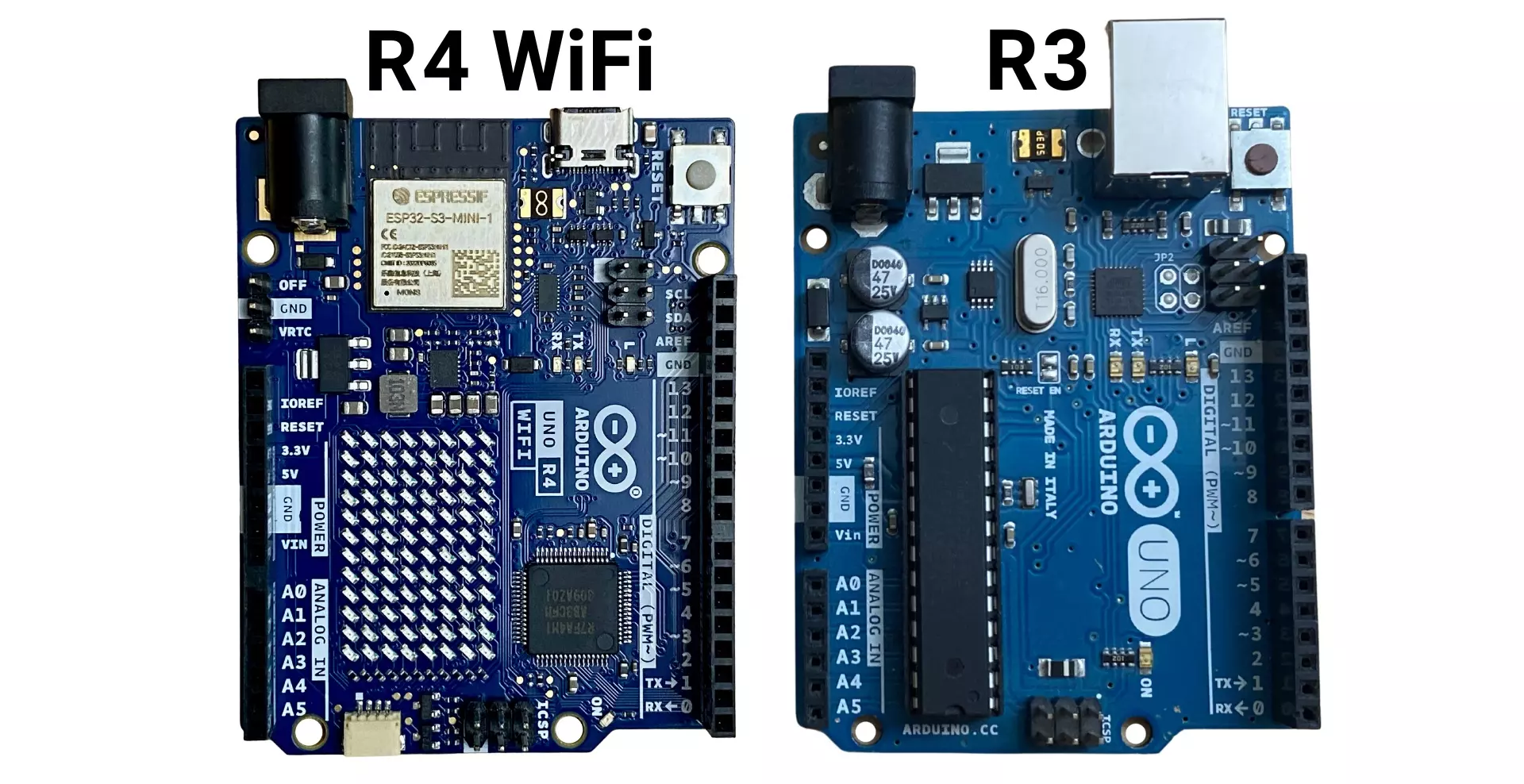
| Feature | Arduino UNO R4 Minima | Arduino UNO R4 Wi-Fi | Arduino UNO R3 |
|---|---|---|---|
| Microcontroller | Renesas RA4M1 (ARM Cortex-M4, 48 MHz) | Renesas RA4M1 (ARM Cortex-M4, 48 MHz) + ESP32-S3 for Wi-Fi/BLE | ATmega328P (8-bit, 16 MHz) |
| Architecture | 32-bit | 32-bit | 8-bit |
| Flash Memory | 256 KB | 256 KB | 32 KB |
| SRAM | 32 KB | 32 KB | 2 KB |
| EEPROM | 8 KB | 8 KB | 1 KB |
| Operating Voltage | 5V | 5V | 5V |
| Input Voltage (VIN) | 6V – 24V | 6V – 24V | 7V – 12V |
| Digital I/O Pins | 14 | 14 | 14 |
| PWM Pins | 6 | 6 | 6 |
| Analog Input Pins | 6 (14-bit resolution) | 6 (14-bit resolution) | 6 (10-bit resolution) |
| DAC (True Analog Output) | Yes (1 channel) | Yes (1 channel) | No |
| Serial (UART) | Yes | Yes | Yes |
| I²C (SDA, SCL) | Yes | Yes | Yes |
| SPI | Yes | Yes | Yes |
| CAN Bus | Yes | Yes | No |
| Wi-Fi & Bluetooth | No | Yes (ESP32-S3) | No |
| USB Interface | USB-C | USB-C | USB-B |
| LED Matrix | No | Yes (12×8) | No |
| Real-Time Clock (RTC) | Yes | Yes | No |
| Qwiic Connector | No | Yes | No |
| Power Consumption | Lower than UNO R3 | Lower than UNO R3 | Higher |
| Shield Compatibility | Yes (Same form factor as UNO R3) | Yes (Same form factor as UNO R3) | Yes |
Accessories and Add-ons for Arduino UNO R4
1. Shields
- Motor Driver Shield: For controlling motors in robotics projects.
- Ethernet Shield: For wired network connectivity (compatible with UNO R4 Minima).
- LCD Shield: For adding a display to your projects.
2. Sensors
- Temperature and Humidity Sensor (DHT22): For environmental monitoring.
- Ultrasonic Sensor (HC-SR04): For distance measurement.
- Accelerometer (MPU6050): For motion sensing.
3. Actuators
- Servo Motors: For precise control in robotics.
- Relay Modules: For controlling high-power devices.
4. Communication Modules
- LoRa Modules: For long-range wireless communication.
- RFID Modules: For identification and access control.
Conclusion
The Arduino UNO R4 Minima and Wi-Fi versions represent a significant leap forward in the Arduino UNO series. With enhanced performance, modern connectivity options, and a rich set of peripherals, these boards are versatile tools for a wide range of applications, from IoT and automation to education and prototyping. Whether you’re upgrading from the UNO R3 or starting fresh, the UNO R4 is a powerful and future-proof choice for your projects.
For more details, refer to the official Arduino UNO R4 datasheet and documentation available on the Arduino website. Happy Learning!
FAQs on Arduino UNO R4
1. Is the Arduino UNO R4 compatible with R3 shields?
Yes, the UNO R4 maintains the same form factor and pinout as the R3, ensuring compatibility with most shields.
2. Can I use the UNO R4 for battery-powered projects?
Yes, its low power consumption makes it suitable for battery-powered applications.
3. What is the price of the Arduino UNO R4?
The Arduino UNO R4 Minima is priced around 20$, while the Wi-Fi version costs approximately 30$.
4. How do I program the UNO R4?
You can program it using the Arduino IDE, which supports the new RA4M1 microcontroller.
5. What are the advantages of the Wi-Fi version?
The Wi-Fi version includes built-in Wi-Fi, Bluetooth, and an LED matrix, making it ideal for IoT and interactive projects.
6. Can I use the UNO R4 for industrial applications?
Yes, its CAN BUS support and robust peripherals make it suitable for industrial automation and control systems.
L293D Pin Diagram, Working and Interfacing of L293D with Arduino